Two player games on your phone: what runs in a browser
What you need for a phone match, how to invite a friend with a link or a code, and which games work when the screen is small and the connection is not great.

Short answer: you can play two player games on a phone over the network without installing anything. Both games open in a browser, and a friend joins with a link, a room code or a QR code. You need two devices with internet: two phones, or a phone and a tablet or laptop.
Checkers and tic tac toe both work. Each has a room for a friend, a two players on one screen mode, and a game against the computer. Below is how it works, what changes on a small screen and what to check before the first game.
How it works: browser, room, link and code
Open the game page in any browser. Nothing to download, no app store. The online game runs through the studio server, so both players need to be online.
One player creates a room. The game shows a large six-character code, a link and a QR code. Your friend opens the link in their browser and takes a seat. If the link does not open, they type the code by hand.
The QR code works when your friend is in the same room and can point a camera at your screen. Phone to phone, you cannot point the camera at your own display, so send the link or the code in a message. The link is more reliable: nobody has to retype anything, and it opens the right game.
The other route is opponent search. The game matches you with someone looking for the same rules. That is not the way to play a particular friend, because you may land with different people.
You do not need an account: the game remembers a guest in the browser. Signing in is for purchases and for keeping progress in a profile across devices.
Checkers on a phone
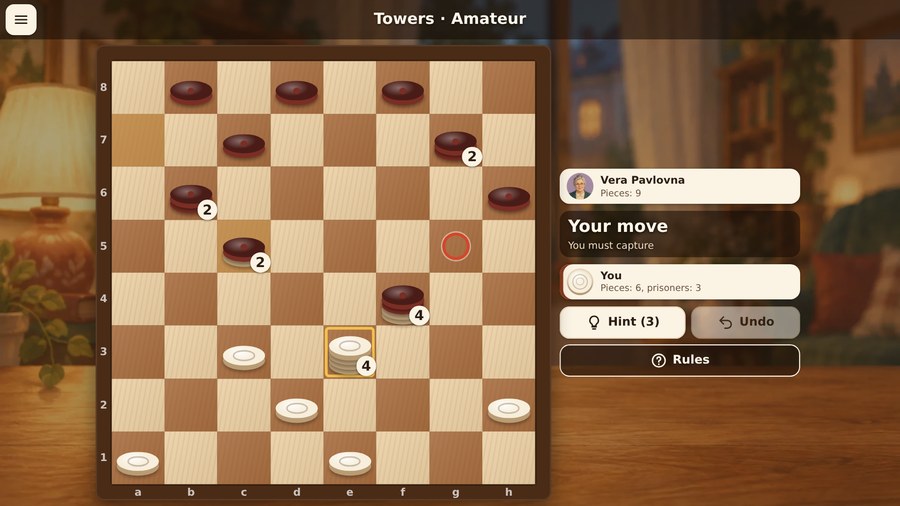
Checkers has nine rule sets. Russian checkers come first: an 8 by 8 board, capturing is compulsory, a man can capture backward, and a king moves any number of squares. Start there on a phone: the rules are familiar and the board fits without shrinking.
The controls are simple. Tap your piece, then tap the highlighted square. You can also drag a piece, but tapping is safer on a phone: your finger does not cover the square and does not slip into the next one. Pieces that can capture are outlined, so a compulsory capture is never a surprise.
There are four ways to play:
- against the computer at three levels: the beginner makes mistakes, the amateur sees threats, the master plays for real;
- two players on one screen, passing the phone;
- online in a room for a friend;
- online through opponent search.
Online against a live person there are no hints and no undo. That is fair to your opponent, but a beginner should warm up against the computer first, where hints are available. If one of you is much stronger, play giveaway: the first player to give away all their pieces, or to be left with no move, wins.
Avoid big variants on a phone: international checkers uses 100 squares, Canadian 144, and the squares get tiny. Russian and Brazilian are played on 8 by 8 and are easier on the eyes.
Tic tac toe on a phone
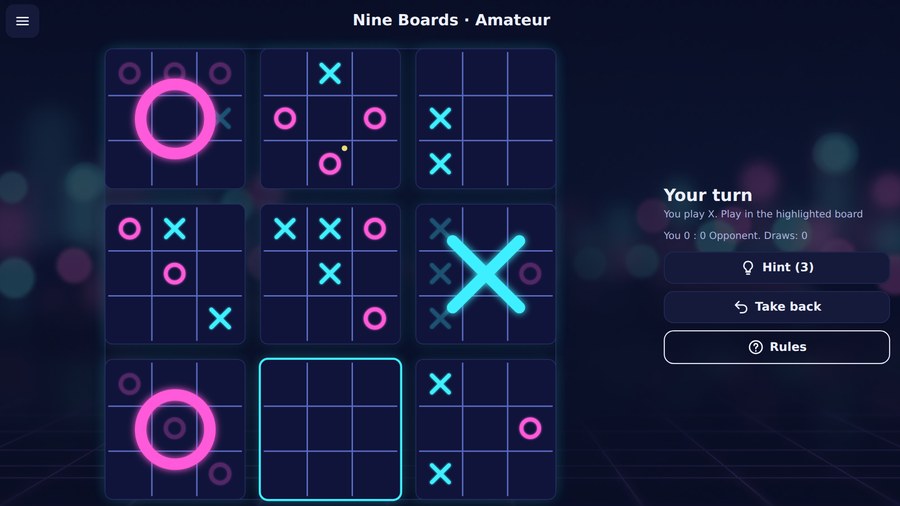
Tic tac toe has nine games. Classic 3 by 3 takes a minute, but with correct play both sides draw. That is why the relatives are more interesting for two people: Vanishing, where a fourth mark erases the oldest; Nine Boards, with a big board made of nine small ones; Five in a Row on 11 by 11; Misère, Wild, Order and Chaos, Notakto and Cube Slide.
Online, each move has thirty seconds. That is plenty for Classic and Vanishing, but might be tight for Nine Boards and Five in a Row, where a move needs thought. If one of you likes to think for a while, start with the short games.
On a phone, the first tap shows the mark and the second places it. A slip of the finger does not cost a move, because you can still change your mind. On the small cells of Nine Boards this matters.
The room and invitation work the same as in checkers: code, link and QR code. There is also opponent search for the game you picked. A best-move hint is available against the computer and in two players on one screen, but not online.
Two players, one phone
If you are sitting next to each other, you do not need the network at all. Pick two players on one screen and pass the phone. In checkers and tic tac toe both players see the board and there are no hidden cards, so this mode works without caveats.
Agree in advance who holds the phone and how you pass it. In checkers you pass after a move. In tic tac toe the first tap only shows the mark, so a stray touch while passing does not place an X.
One phone means one screen: a call or a closed tab stops the game for both. For a long game, two devices are better.
What is awkward on a phone
- Small cells. Nine Boards, Five in a Row on 11 by 11 and the large checkers variants need care on a phone. Classic tic tac toe and Russian checkers fit better.
- QR codes. Phone to phone, a camera is awkward. Keep the link or the code within reach.
- Connection. Online, both players need internet. A weak signal, a call or a network switch can interrupt the game.
- The screen goes dark. A phone may lock during a long game. Keep it awake or play shorter games.
- Battery and data. A browser and a network use battery and data like any online game. Exact numbers depend on the device and the connection, so we will not promise any.
Which game fits the situation
| Situation | Try |
|---|---|
| A five-minute break | Classic tic tac toe or Vanishing |
| Half an hour and both know checkers | Russian checkers |
| One player is much stronger | Giveaway |
| Something unfamiliar | Towers or Nine Boards |
| Different cities | a room by link in checkers or tic tac toe |
| A weak connection | two players on one screen |
| A beginner | the computer at beginner level, then a game together |
Honest downsides
- Online play needs internet on both devices. Only the one-screen mode works offline.
- Checkers online has no hints and no undo.
- Thirty seconds per move can be tight in Nine Boards.
- Large boards are awkward on a small screen, and a QR code cannot be scanned phone to phone.
- A game runs in real time, so both players have to be at the screen at the same time.
- A call or a closed tab interrupts the game.
FAQ
Do I need to install an app? No. The game opens in a browser on a phone, tablet or computer. There is nothing to download.
How do I invite a friend? Create a room and send your friend the link. If the link does not open, read out the six-character code and your friend types it into the join field. A QR code works when your friend is in the same room.
Can two people play on one phone? Yes. Choose two players on one screen and pass the phone after a move. No network is needed.
Do I need an account? Not to play. The game remembers a guest in the browser. An account is for purchases and for keeping progress in a profile.
Can I play without internet? Only on one screen. Online play needs internet on both devices, because the game runs through the server.
How long does a game take? Tic tac toe takes from a minute to ten, depending on the game. Checkers runs longer, especially international and Canadian. Online tic tac toe gives thirty seconds per move.
Short version: open the game in a browser, create a room, send your friend the link and play. If you are in the same room, one phone and the two-player mode are enough.
More two-player options are in our collection two player games. If you want to pick by mood and group size, read what to play with a friend online.